1. Export a CSV marker file from Frame.io
Export comments from Frame.io in the video comments menu "Download to File" > "CSV".
2. Use the "Převodník značek" to convert the CSV marker file into a CSV file
Open the free Převodník značek, select "Frame.io > Comments (.csv)" and set "convert" to "CSV for Google Sheets". Generate and download the file. Pokud máte s převodem souboru problémy, můžete kontaktovat bezplatnou podporu.
3. Import the CSV file into Google Sheets
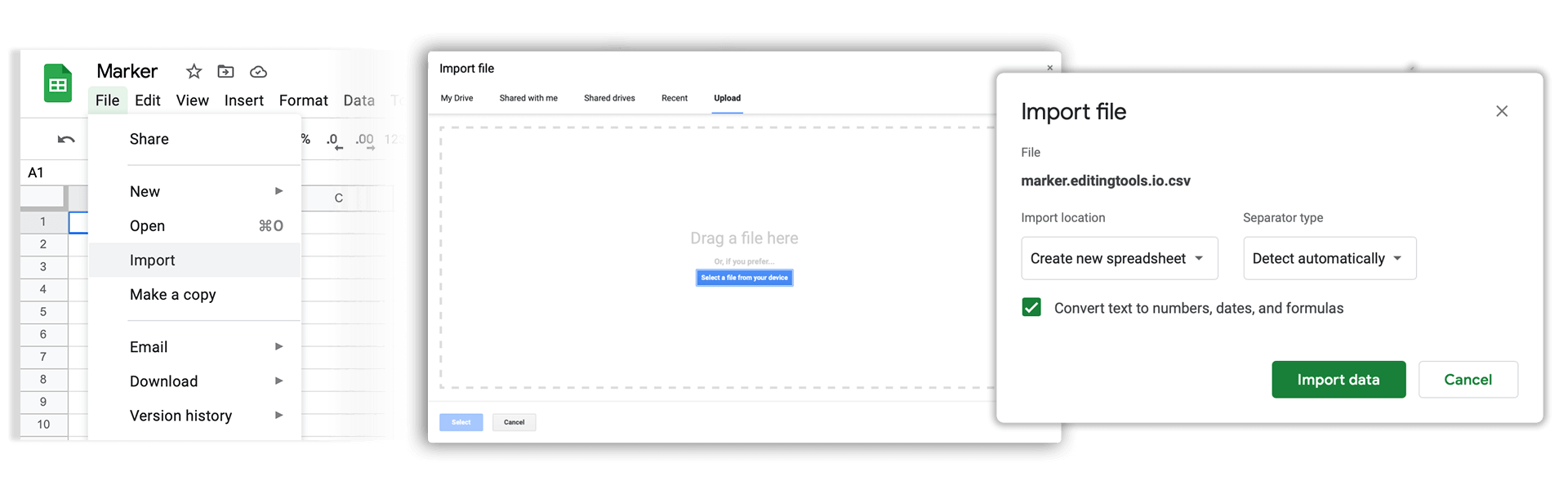
Open Google Sheets and go to "File -> Import". Upload the generated CSV file and press "Import Data" to generate the Sheet with all markers.
🚀 Hotovo
To je zatím vše! Pokud vám byl tento návod užitečný, sdílejte jej prosím a podpořte nás. Pokud máte návrhy, jak bychom mohli workflow vylepšit, dejte nám prosím vědět!