1. Export a CSV marker file from Pix
Open the comments panel on the right side in Pix. Press the three dots and select "Export". Now you can then download the CSV file from Pix.
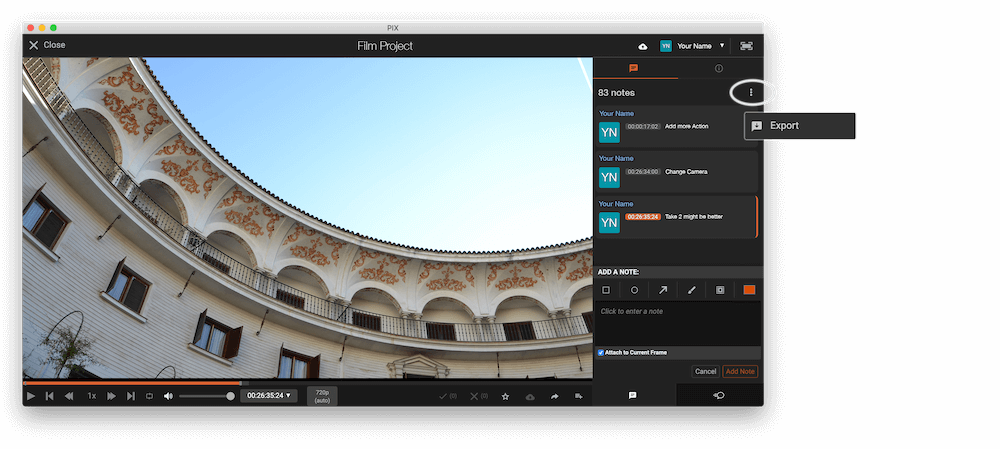
The timecode in Pix starts with 00:00:00:00 for each clip, so you may need to use the offset function on EditingTools.io to sync it with you timeline or move it manually in your NLE (editing software).
2. Use the "Převodník značek" to convert the CSV marker file into a SRT subtitle file
Open the free Převodník značek, select "Pix Systems > Comments (.csv)" and set "convert" to "SRT". Generate and download the file. Pokud máte s převodem souboru problémy, můžete kontaktovat bezplatnou podporu.
3. Use the "Nástroj the konvertor titulků" to convert the SRT subtitle file into an ASS subtitle file
Open the free Nástroj the konvertor titulků, select "SRT" and set "convert" to "ASS". Generate and download the file. Pokud máte s převodem souboru problémy, můžete kontaktovat bezplatnou podporu.
🚀 Hotovo
To je zatím vše! Pokud vám byl tento návod užitečný, sdílejte jej prosím a podpořte nás. Pokud máte návrhy, jak bychom mohli workflow vylepšit, dejte nám prosím vědět!